
What Is an SSL Certificate Chain?
An SSL certificate chain links your website’s certificate through one or more intermediate certificates to a root authority the visitor already trusts. Learn how the chain works, why it breaks and how to test it.
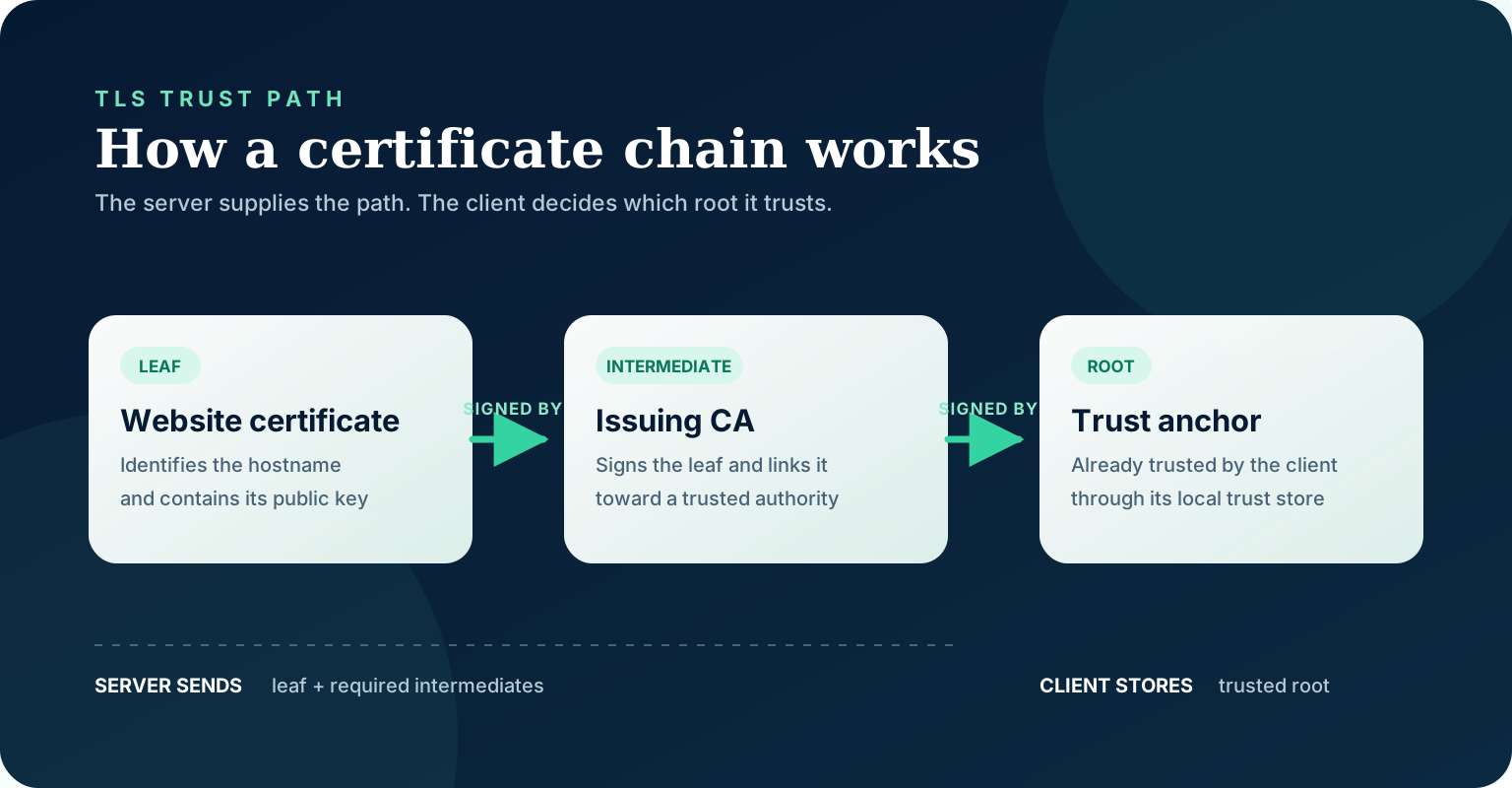
An SSL certificate chain is the ordered set of digital certificates that lets a browser connect your website’s certificate to a certificate authority it already trusts. The usual path is your site’s certificate, one or more intermediate CA certificates, and a root CA represented in the visitor’s trust store.
The modern protocol is TLS, not the retired SSL protocol, but administrators, hosting dashboards and searchers still commonly say ‘SSL certificate.’ The more precise names are TLS certificate chain, certification path and chain of trust.
The three parts of a certificate chain
A public website normally relies on three certificate roles. They form a hierarchy, but they do not all come from the web server during the TLS handshake.
| Certificate | What it identifies | Who signs it | Where it normally comes from during a visit |
|---|---|---|---|
| Leaf or end-entity certificate | Your hostname and public key | An intermediate CA | The web server |
| Intermediate CA certificate | A delegated certificate authority | A root CA or another intermediate | The web server |
| Root CA or trust anchor | The authority at the top of the path | Usually itself | The browser or operating-system trust store |
Leaf certificate
The leaf certificate is issued for the service the visitor requested. For a website, its Subject Alternative Name extension normally contains the relevant hostname, such as example.com or www.example.com. It also contains the site’s public key, validity period, issuer and extensions that restrict how the certificate may be used.
‘Leaf’ describes its position at the end of the issuing hierarchy. You may also see server certificate, end-entity certificate or domain certificate.
Intermediate certificate
A root CA generally delegates day-to-day certificate issuance to one or more intermediate CAs. An intermediate has its own certificate and signing key. It signs the leaf certificate below it, while a higher CA signs the intermediate.
This separation limits how often a root key must be used and lets an authority create different issuing hierarchies. A chain can contain more than one intermediate, although many website chains use one.
Root certificate and trust anchor
The root represents the point where verification stops and configured trust begins. Browsers, operating systems and applications maintain root programs or trust stores. A root being self-signed does not make it trusted by itself; the client’s decision to include or accept that root is what makes it a trust anchor.
RFC 5280’s path-validation model (opens in a new tab) treats the trust anchor as an input to validation rather than another certificate that must be discovered from the server.
How the browser validates the chain
When a browser connects to an HTTPS website, the TLS handshake identifies the server and negotiates encryption. The certificate part of that handshake can be understood as a six-step check.
- 1The server sends its leaf certificate first. It also sends the intermediate certificates needed to connect that leaf to a trust anchor.
- 2The client checks the requested identity. The hostname must match an acceptable identity in the certificate, normally a DNS name in Subject Alternative Name.
- 3The client builds a certification path. Each certificate’s issuer must connect to a certificate capable of validating its signature.
- 4The client verifies the signatures and constraints. This includes CA status, key usage, path-length constraints, critical extensions and applicable policies.
- 5The client checks time and other acceptance rules. A certificate outside its validity period fails even if its signatures link correctly. Applications can also apply revocation and local policy checks.
- 6The path terminates at a trusted anchor. If no acceptable trust anchor is available, the chain is not trusted on that client.
The standards separate these jobs. RFC 5280 (opens in a new tab) specifies certification-path validation, while RFC 9525 (opens in a new tab) covers checking a TLS service identity such as a hostname. A chain can therefore be cryptographically valid yet still be wrong for the domain being visited.
Why the server usually does not send the root certificate
The server is not supposed to create trust by sending a root certificate. An attacker could send an arbitrary self-signed root just as easily. The client must already possess or explicitly trust the anchor through an independent mechanism.
TLS 1.3 makes the transmission order explicit: the sender’s certificate comes first, each following certificate should certify the one before it, and a trust-anchor certificate may be omitted when the peer is known to possess it. See the Certificate message rules in RFC 8446 (opens in a new tab).
For a typical website, the correct payload is therefore:
The client then joins that supplied chain to a root in its own trust store. Sending the root is usually unnecessary and adds bytes to every full handshake. It also does not repair a missing intermediate.
Certificate, private key, chain and full chain are different files
Hosting panels use inconsistent labels, so it helps to identify files by content rather than filename alone.
| Common label | Typical contents | Safe to share publicly? |
|---|---|---|
| cert.pem or certificate.crt | Leaf certificate | Yes |
| chain.pem or CA bundle | Intermediate certificate or certificates | Yes |
| fullchain.pem | Leaf followed by intermediate certificate or certificates | Yes |
| privkey.pem or private.key | Private key paired with the leaf certificate | No |
A certificate chain contains public certificates. It never substitutes for the private key. The private key must remain secret and must match the public key in the leaf certificate.
Some servers request separate certificate and chain files. Others expect a single full-chain file with the leaf first. Follow the syntax for the exact server, load balancer, CDN or hosting platform you operate; copying a configuration for another product can produce a valid-looking but incomplete deployment.
What an incomplete certificate chain means
An incomplete chain usually means the server supplied the leaf certificate but omitted an intermediate needed to reach a root trusted by the client. The leaf can be unexpired and issued for the correct hostname while the connection still fails.
Common symptoms include:
- ‘Unable to get local issuer certificate’ or ‘unable to verify the first certificate.’
- A browser privacy warning or an API client reporting an unknown certificate authority.
- The site working on one device but failing in another app, bot, older operating system or clean test environment.
- A deployment passing a superficial certificate check but failing when verification is forced.
Different results do not prove that the configuration is correct. One client may have cached an intermediate, fetch it from an Authority Information Access URL, or build an alternative path that another client cannot use. The server should deliver the required intermediate chain consistently instead of depending on client repair behavior.
Other problems can resemble an incomplete chain: an expired intermediate, incorrect certificate order, an untrusted private CA, a hostname mismatch, a certificate and private-key mismatch, or a TLS-terminating proxy still serving an old bundle.
How to inspect a website’s certificate chain
Start with an external test from a clean environment. Browser certificate viewers are useful for understanding the path that browser built, but they may not show exactly what the server transmitted.
Inspect what the server sends with OpenSSL
OpenSSL’s s_client can display the certificates presented by a server. Replace the hostname in both positions:
The `-servername` argument sends Server Name Indication. It matters when several HTTPS sites share one IP address; omitting it can test the wrong virtual host.
Do not treat a completed s_client connection as proof that validation passed. OpenSSL documents s_client as a diagnostic tool that can continue after verification errors. Add `-verify_return_error` when you want a certificate verification error to abort the handshake:
The OpenSSL s_client documentation (opens in a new tab) explains both `-showcerts` and the stricter verification behavior.
Read the output in order
Certificate 0 should be the site’s leaf certificate. Its issuer should match the subject of certificate 1. If there is another intermediate, certificate 1’s issuer should match certificate 2’s subject. You normally should not expect the root to be transmitted.
Also inspect the verification result, hostname, Subject Alternative Name values, validity dates and the endpoint actually reached. A green result for one hostname does not cover every subdomain, load balancer or regional edge.
How to fix a broken chain
The exact control varies by platform, but the safe sequence is consistent.
- 1Identify the active TLS endpoint. The certificate may terminate at a CDN, reverse proxy, managed load balancer or hosting control panel rather than the origin web server.
- 2Download the correct intermediate bundle from the issuing CA or certificate automation tool. Do not copy an intermediate from an unrelated website.
- 3Install the leaf and intermediate certificates in the format your platform expects. For a combined file, keep the leaf first and then move upward through the intermediates.
- 4Keep the private key separate and protected. Confirm that it matches the leaf certificate before reloading the service.
- 5Reload every active endpoint. Multi-node and multi-region systems can keep serving an old chain from one instance.
- 6Retest externally with strict verification. Test important hostnames and application clients, not only your normal desktop browser.
If certificate automation manages renewal, fix the source configuration rather than manually patching the current file. Otherwise the next renewal can restore the broken chain.
Does a broken certificate chain affect SEO?
A certificate-chain failure is first an availability and trust problem. A crawler or user that cannot complete TLS does not receive the page normally. Google’s published HTTPS-selection criteria include the server having a valid TLS certificate, and its current technical requirements say an indexable page must work and return a successful response. See Google’s guidance on indexing HTTPS pages (opens in a new tab) and Search technical requirements (opens in a new tab).
Do not reduce the diagnosis to a ranking-factor claim. The operational risk is more direct: failed crawling, inaccessible pages, interrupted checkouts or forms, API failures and lost visitor confidence.
A technical SEO audit should test HTTPS responses from outside the normal office environment and distinguish protocol, certificate, redirect and application errors. If a team is debating content while crawlers cannot reliably fetch the site, use the diagnostic sequence in technical SEO versus content SEO to resolve the infrastructure constraint first. SSL/TLS maintenance also belongs in the broader business website essentials checklist.
Certificate-chain checklist
Before closing an incident or certificate renewal, confirm all of the following:
- The leaf certificate covers every intended hostname.
- The leaf certificate is first in the transmitted list.
- Every required intermediate is present and ordered toward the root.
- The root is trusted by the clients you support; sending it from the server is not your trust strategy.
- All certificates in the path are within their validity periods.
- The private key matches the leaf and has not been exposed.
- Every CDN edge, load balancer and origin in scope serves the intended chain.
- Strict external verification succeeds without relying on a cached intermediate.
- Monitoring will alert before expiration and after future renewals.
Frequently asked questions
Is an SSL certificate chain the same as a chain of trust?
In ordinary web operations, the phrases refer to the same linked trust path. Standards more often use ‘certification path,’ while ‘chain of trust’ emphasizes that verification terminates at a trust anchor selected by the client.
What order should certificates use in a full-chain file?
Use the leaf certificate first, followed by the intermediate that issued it, then any higher intermediate. The root is normally omitted. Confirm the exact file directives required by your server or platform.
Can a chain be valid without the root certificate in the server response?
Yes. That is the normal web configuration. Trust anchors are distributed independently in client trust stores, so the server usually sends the leaf and required intermediates but not the root.
Why does the site work in one browser but fail in another?
Clients can have different trust stores, cached intermediates, path-building behavior and policies. A clean external test can reveal a server-side omission hidden by your usual browser.
Does a valid chain guarantee a valid HTTPS certificate?
No. The client must also check the hostname, dates, allowed uses, critical constraints and applicable policy. Revocation and local security rules can add further checks.
What is the difference between SSL and TLS here?
TLS is the current protocol family. ‘SSL certificate’ remains a common product and search term, but the certificate chain used by modern HTTPS connections is a TLS/X.509 certification path.
SEO Companies Hub Editorial
Directory Research
SEO Companies Hub publishes independent, research-backed guidance for US businesses choosing an SEO partner. We score agencies on published facts, separate marketing claims from evidence, and date-check anything that can change.